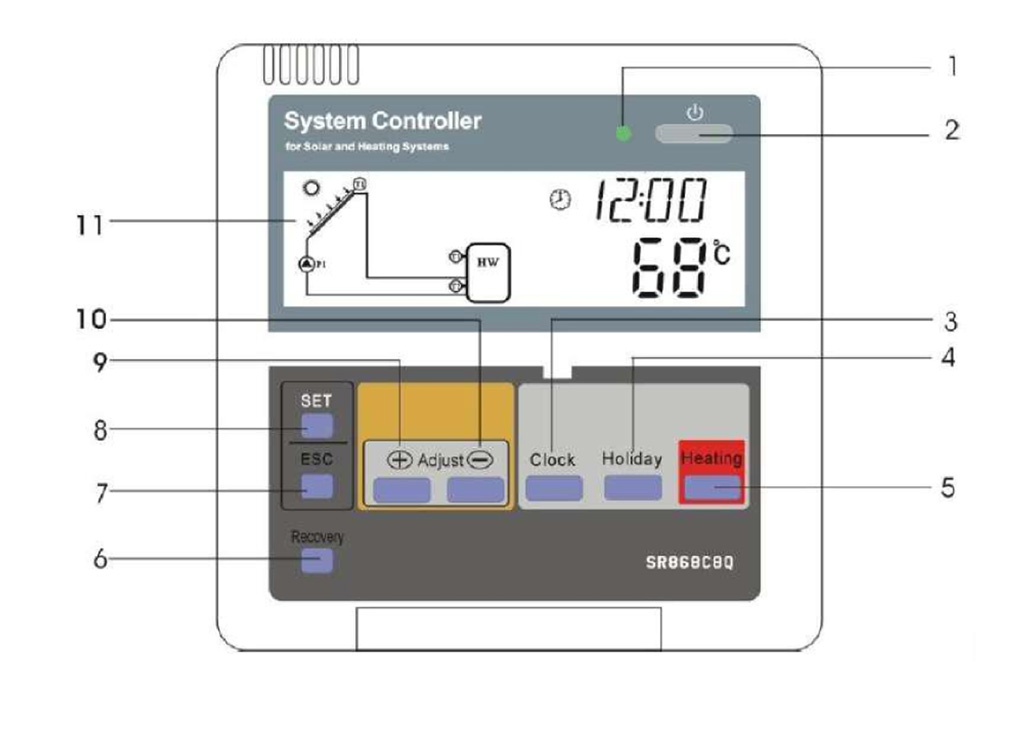


SUNSCAN SR868C8 Quick Setup Guide

Please note these are basic keystroke details to setting up your system. For in-depth information, please consult your manual.
Setting the Timed Heating
Press SET
tHEt
Press SET
tH1o appears (Heating Period 1 On) 03:00 default
Press SET – Hour will flash adjust on time (hour) using + or –
Press SET – Minutes will flash Adjust on time (minutes) using +or –
Press SET – Temperature will flash Adjust on Temperature using +or – (Default 55ºC)
Press ESC
Press +
tH1F appears (Heating Period 1 Off) 06:00 default
Press SET – Hours will flash adjust off time (hour) using + or –
Press SET – Minutes will flash Adjust off time (minutes) using +or –
Press SET – Temperature will flash
Adjust off Temperature using +or – (Default 60ºC)(Off Temp must be min 3ºC above on temp for heating period 1)
Press ESC
Press +
tH2o appears (Heating Period 2 On) 10:00 default
Press SET – Hour will flash adjust on time (hour) using + or –
Press SET – Minutes will flash Adjust on time (minutes) using +or –
Press SET – Temperature will flash Adjust on Temperature using +or – (Default 42ºC)
Press ESC
Press +
tH2F appears (Heating Period 2 Off) 15:00 default
Press SET – Hours will flash adjust off time (hour) using + or –
Press SET – Minutes will flash Adjust off time (minutes) using +or –
Press SET – Temperature will flash
Adjust off Temperature using +or (Default 48ºC)
(Off Temp must be min 3ºC above on temp for heating period 2)
Press ESC
Press +
tH3o appears (Heating Period 3 On) 15:01 default
Press SET – Hour will flash adjust on time (hour) using + or –
Press SET – Minutes will flash Adjust on time (minutes) using +or –
Press SET – Temperature will flash Adjust on Temperature using +or – (Default 55ºC)
Press ESC
Press +
tH3F appears (Heating Period 3 Off) 18:00 default
Press SET – Hours will flash adjust off time (hour) using + or –
Press SET – Minutes will flash Adjust off time (minutes) using +or –
Press SET – Temperature will flash
Adjust off Temperature using +or – (Default 60ºC)
(Off Temp must be min 3 degrees above on temp for heating period 3)
Press ESC. Press ESC
Setting the time
Press Clock the hour indicator begins to flash Press + or – until the desired hour is set.
Press Clock the minute indicator begins to flash Press + or – until the desired minute is set. Press Clock the day indicator begins to flash Press + or – until the desired day is set.
Press Clock to complete the proce